
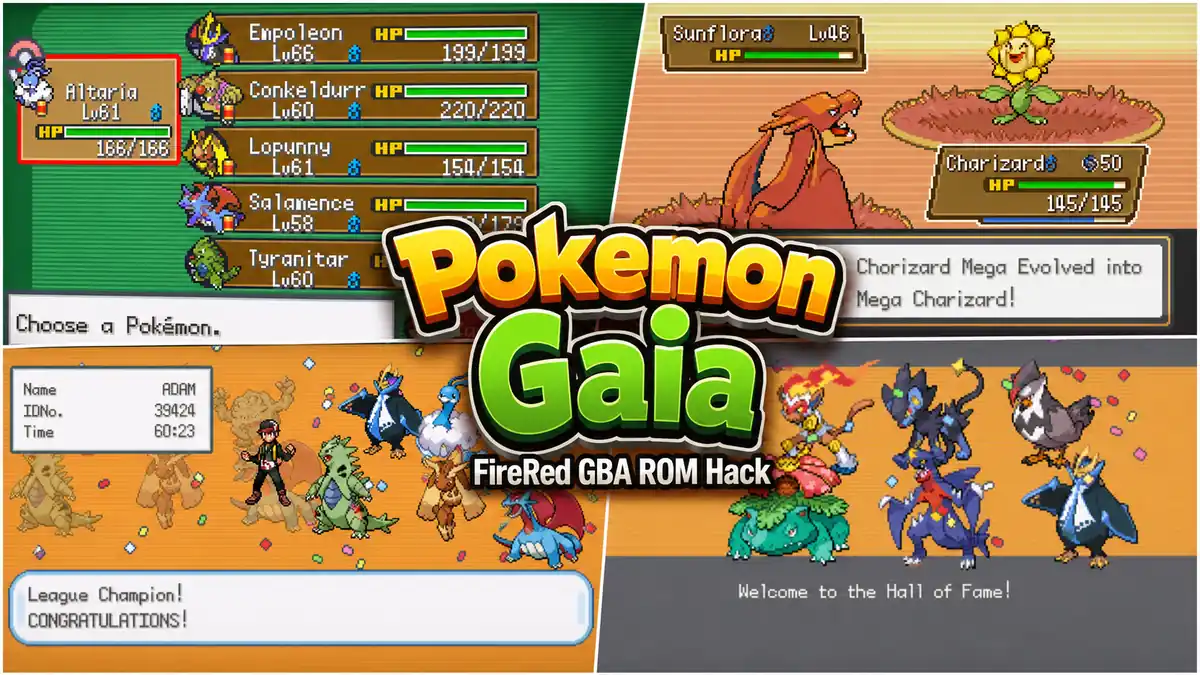
Pokemon Gaia keeps showing up in ROM hack recommendation lists years after its last update, and it earns that. Created by Spherical Ice, it is one of the most polished Pokemon FireRed ROM hacks ever built — not because it tries to do everything, but because it does the core Pokémon adventure feel genuinely well. New region, original story, modern mechanics layered over a familiar GBA engine, and a level of map design that won actual community awards. If you are looking for something that feels like a proper classic Pokémon game rather than a difficulty mod or a feature showcase, Gaia is the one people keep pointing to.
Last reviewed: June 2026. Current version: Beta v3.2 (released November 8, 2018).
⭐ Best for: Players who want a classic-style Pokémon adventure with a new region, a real story, familiar GBA pacing, and a smoother experience than extreme difficulty hacks. If you finished FireRed and want something that feels like a brand-new game without reinventing every system, this is it.
Why Pokemon Gaia Still Gets Recommended
Gaia came out of a scene full of hacks that either cranked the difficulty to punishing levels or threw in a hundred new systems to show off what the FireRed engine could do. Gaia did neither. It focused on building a region that felt like it was actually designed rather than assembled — towns with atmosphere, routes that had something to find, a story that gave you a reason to keep moving forward.
The Orbtus region is the biggest reason the hack still gets talked about. It has a mythology, ancient ruins tied to the main plot, and a sense that something is at stake beyond just collecting eight badges. Professor Redwood connects you to the mystery early, and the seismic activity that drove the ancient civilization’s collapse feeds directly into what your character is dealing with in the present day.
On top of that, Gaia won multiple PokéCommunity awards: Overall Favourite, Best Mapping, Best Scripting, Best Storyline, Best Gameplay, and Most Engaging Hack. That kind of sweep across different categories is rare, and it reflects how consistently well-executed the whole thing is rather than just excelling in one area.
What Is Pokemon Gaia?
Pokemon Gaia Version is a ROM hack of Pokémon FireRed, created by Spherical Ice with help from MrDollSteak, Shinoya, and a number of contributors from the ROM hacking community. The latest public release is Beta v3.2, which came out in November 2018 as a bugfix update to v3.0.
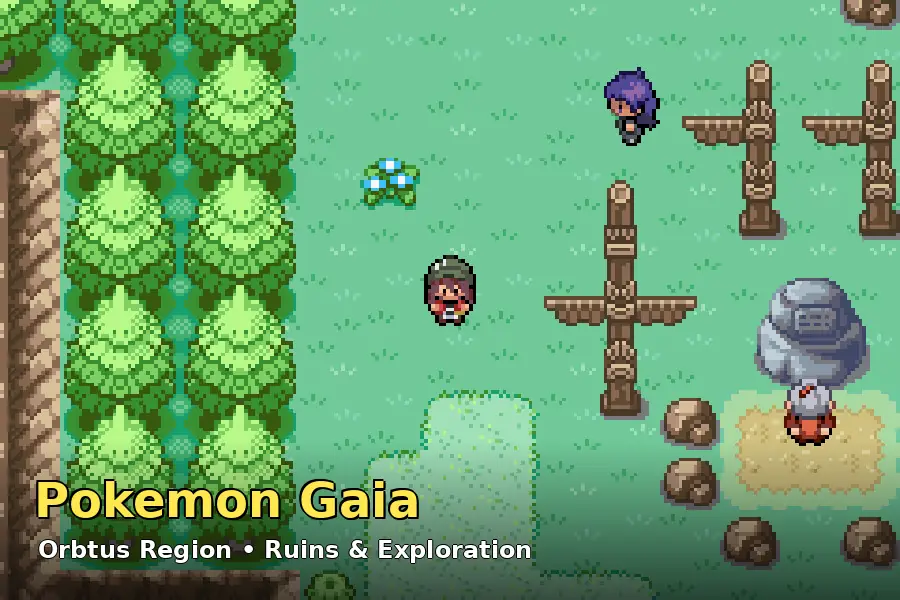
The game is set in the Orbtus region — a place defined by its ancient history. A civilisation once thrived here, building temples and monuments to their gods. A series of catastrophic earthquakes wiped them out. In the present day, the region’s seismic activity is rising again, and Professor Redwood is worried enough to enlist new trainers. You start out in Celanto Town, a seaside settlement near some mysterious Totem Poles, and the story unfolds from there.
One important thing to know before you start: v3.2 is a beta. The main story is complete — all eight gyms, the full narrative, the Elite Four, and the Champion. What is missing is post-game content. You can keep playing after the credits roll, but there is nothing waiting for you there yet. Whether that matters to you depends on how you approach ROM hacks. As a story-driven adventure, Gaia delivers a full experience. As a post-game completionist project, it does not.
What Makes the Orbtus Region Work
A lot of ROM hacks struggle with their custom regions because the maps feel like reskinned FireRed routes with different wild Pokémon. Orbtus does not feel that way. The ruins and temples woven throughout the region give the world a sense of depth before the story even directly addresses them. Walking into an ancient structure mid-route, spotting a relic from the lost civilisation, or finding a connection between the map and the lore makes exploration feel purposeful rather than just filler between towns.
The map design itself won Best Mapping in the PokéCommunity awards for a reason. Routes have varied geography, cities have distinct identities, and there are areas — like underwater sections fully ported from Ruby, Sapphire, and Emerald — that simply do not exist in the FireRed original. Rock Climb adds vertical navigation that makes the world feel more three-dimensional. Even if you have played FireRed dozens of times, the layout of Orbtus will not feel like the same old Kanto path recycled.
The pacing also holds up. The game does not rush you or drag through empty areas. Gyms are spread with enough content between them to keep things moving, and the side areas are worth checking rather than being obvious dead ends. What players usually notice first is that it simply feels like a well-made Pokémon game — which sounds like a low bar until you play ROM hacks where that basic feel is missing.
Pokemon Gaia Features
These are verified features from the official PokéCommunity thread and creator documentation:
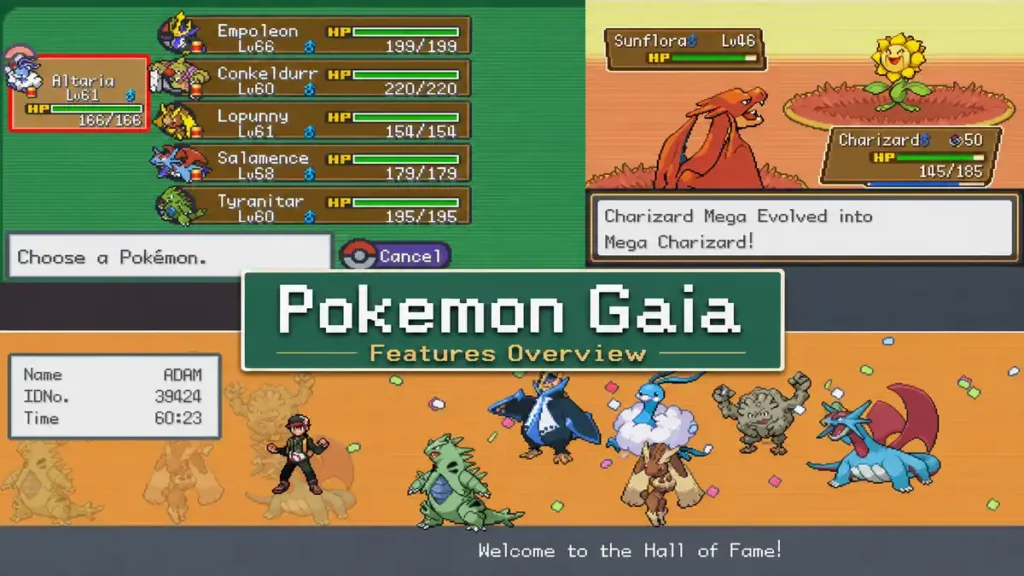
- New region — Orbtus. Completely custom map with original towns, routes, and geography. Not a Kanto reskin.
- Original story. A narrative built around Orbtus’s ancient history, rising seismic activity, and a mystery tied to the ruins and monuments scattered throughout the region.
- Pokémon from Generations 1 through 6. A large cross-generational roster available throughout the game.
- Physical/Special/Status split. The Gen 4 split is implemented, so moves are categorised by their actual effect rather than their type.
- Mega Evolution. An in-battle Mega Evolution system with Mega Stones hidden throughout the region.
- Fairy type. Added, along with the updated type chart.
- Modern moves and abilities. Move sets and abilities updated to OmegaRuby and AlphaSapphire standards, with working effects and animations.
- Competitive items. Modern items like Choice Specs, Assault Vest, Ability Pill, and others are available.
- Rock Climb and climbable walls. Vertical navigation feature that opens up area exploration.
- Dive and underwater maps. Fully ported from the Hoenn games, giving Gaia areas that FireRed never had.
- Original music. Custom tracks for certain areas and battles, including Windmist City’s theme and the Elder Knights battle music.
- Updated sprites. DS-style 64×64 Pokémon sprites, updated Trainer sprites, and accurate overworld sprites.
- Hidden Grottos. Optional exploration areas with additional encounters and items.
- In-game save type requirement: Flash 128 KB. This must be configured correctly in your emulator or saves will not work properly.
Pokemon Gaia Download and Patch Notes
⚠️ Patching note: Pokemon Gaia is distributed as a UPS patch file, not a pre-patched ROM. You need a clean Pokémon FireRed ROM — specifically the 1635 – Pokemon Fire Red (U)(Squirrels) dump — as your base. The 1636 version also works. Use the NUPS or tsukuyomi tools included in the download to apply the patch. If you get a mismatch error, your base ROM is the wrong version.
The current version is Pokemon Gaia Beta v3.2, released November 8, 2018. It is a bugfix update to v3.0, and saves from v3.0 and v3.1 are compatible with it. Saves from v2.5 or older are not compatible with v3.2.
The download includes the UPS patch file plus the NUPS and tsukuyomi patching programs. Unzip everything into the same folder as your clean FireRed ROM, apply the patch, and you have your Gaia .gba file. Keep the unpatched original in a separate folder as a backup — you will need it again if you ever want to repatch cleanly.
A note on version status: as of the time of writing, no v4 has been publicly released. Some community threads mention work toward a future version, but nothing definitive has come out. Always check the official PokéCommunity thread (linked in the sources below) before downloading, in case anything has changed.
How to Play Pokemon Gaia on Android
The creator’s recommendation for Android is My Boy!, and it is the most widely tested option for Gaia. There is one critical setup step that trips up a lot of players: you must set the save type to Flash 128 KB before loading the game. Skipping this causes save corruption or prevents the game from saving at all.
- Get your patched Gaia .gba file. You can patch on a PC using the included NUPS tool, or use an online patcher like marcrobledo.com/RomPatcher.js/ directly on your phone if you cannot patch on desktop first.
- Transfer the .gba file to your Android device.
- Download My Boy! from the Google Play Store.
- Before loading the game: go to My Boy settings and set the save type to Flash 128 KB. This is the critical step most people miss.
- Open the .gba file in My Boy and let it load.
- Use proper in-game saves regularly, not just emulator save states. Gaia has story-specific flags that save states alone may not handle cleanly on all devices.
💡 Android tip: Pizza Boy GBA is a good alternative to My Boy! if you want better performance on mid-range devices. It also supports Flash 128 KB save types. RetroArch with the mGBA core works too but takes more setup. Whichever emulator you use, the Flash 128 KB save setting is non-negotiable for Gaia.
How to Play Pokemon Gaia on PC or Mac
The creator recommends VBA-M for Windows and OpenEmu for Mac. Both are stable choices for Gaia, and both need the same Flash 128 KB save type configuration before you start.
- Patch your clean FireRed ROM using NUPS (included in the Gaia download) or tsukuyomi. Apply the pokemon_gaia_v3.2.ups file to your 1635 Squirrels ROM.
- Download VBA-M for Windows from visualboyadvance.org (or OpenEmu for Mac).
- Configure the save type to Flash 128 KB in your emulator settings before loading the game.
- Load the patched .gba file.
- Save in-game regularly at Pokémon Centers and keep a backup copy of your .sav file somewhere safe.
mGBA is a solid modern alternative for Windows, Mac, and Linux if you prefer something more actively maintained. It handles GBA ROMs reliably and supports the save type configuration. Set Flash 128 KB before your first session regardless of which emulator you use.
Things to Know Before You Start
A few things that will make the experience smoother, especially if you are new to FireRed ROM hacks:
Set Flash 128 KB before anything else. The number one reason players lose progress in Gaia is wrong save type configuration. Do this before loading the game, not after.
Explore thoroughly. Gaia rewards exploration. Mega Stones are hidden around the region, Hidden Grottos have encounters you will not find on routes, and the ruins have their own story to read if you pay attention to the environment. If you’d rather not hunt for everything by hand, our Pokemon Gaia cheats guide has codes for Mega Stones, Rare Candy, and more. Rushing through towns and skipping NPCs means missing content that is genuinely well-written.
Do not expect post-game. If you finish the Elite Four and wonder what is next — there is not much. The story ends with the credits, and you can wander the world, but planned post-game content was not in v3.2. Go in knowing this and you will not be disappointed by the ending.
Back up your saves. Keep a copy of your .sav file somewhere separate, especially before gym battles and major story encounters. Gaia is stable, but ROM hacks on emulators can sometimes have issues with save states behaving differently across sessions.
💾 Save reminder: Always use proper in-game saves at Pokémon Centers alongside emulator save states. The Flash 128 KB setting must be configured correctly or your saves will not function as expected. Check this before your first play session.
Pokemon Gaia vs Other FireRed ROM Hacks
Gaia sits in a specific lane among FireRed hacks, and understanding that lane helps you decide if it is the right pick for where you are right now.
Gaia vs Pokemon Radical Red — These are almost opposite experiences. Radical Red is a difficulty and competitive-mechanics hack that expects you to engage with EV spreads, smarter AI, and proper team strategy. Gaia is a classic adventure that does not punish you for playing casually. Both are excellent, but they serve completely different moods. If you want to be challenged constantly, go Radical Red. If you want to explore a new world without getting blocked by a gym leader every few hours, go Gaia.
Gaia vs Pokemon Unbound — Unbound is the bigger and more ambitious project: custom region, mission system, difficulty modes, post-game content that keeps going for weeks. Gaia is more focused. The Orbtus region feels cohesive in a way that massive hack sometimes cannot achieve. If you want depth and scale above all else, Unbound is the answer. If you want a polished, complete-feeling adventure without the feature overload, Gaia.
Gaia vs Pokemon FireRed Rocket Edition — Rocket Edition is a story reinterpretation of Kanto — same map, different character, much darker tone. Gaia builds something new. Both are story-driven, but they approach it from different angles. Rocket Edition is for players who want to see FireRed from the other side. Gaia is for players who want a fresh world entirely.
Is Pokemon Gaia Worth Playing?
For the right kind of player, yes, without much hesitation. The appeal of Gaia is the combination of a properly designed custom region, a story worth following, and modern mechanics that make the battles feel current. It runs well, it looks good for a GBA game, and it does not overstay its welcome.
This is the kind of hack that fits players who loved the original FireRed experience and want more of that feeling pointed somewhere new. It is not trying to be the hardest thing you have played or to push the GBA engine to its limits. It is trying to be a genuinely enjoyable Pokémon adventure, and it succeeds at that.
The main limitation is the beta status. You get a full main story and all eight gyms, but there is nothing structured after the credits. If you need substantial post-game content, Gaia will leave you wanting more; Pokemon Clover, which unlocks a second region after the League and runs around 100 hours, is a bigger option (fair warning: its humor is aimed at adults). If you are fine with a complete story in a well-crafted world, that limitation probably does not matter to you.
Experienced competitive players who want Radical Red-style challenge will find Gaia too straightforward. But players who are new to ROM hacks, or who want something they can enjoy without looking up team builds and EV distributions, will probably find Gaia one of the most accessible and enjoyable entries in the scene.
Related Guides
- Pokemon FireRed ROM guide — useful if you are new to FireRed-based ROM hacks, patching, and emulator setup basics.
- Pokemon Radical Red — the difficulty-focused FireRed hack. A very different experience from Gaia, but one of the best in the scene.
- Pokemon Unbound — larger scope, custom region, mission system, and substantial post-game. For players who want the full-feature experience.
- Pokemon FireRed Rocket Edition — a story-focused FireRed hack that reframes the original Kanto adventure from Team Rocket’s perspective.
- ROM Hacks category — more guides on FireRed-based ROM hacks.
- best Pokemon FireRed ROM hacks — see how Gaia stacks up against our other top picks.
FAQ
What is Pokemon Gaia?
A ROM hack of Pokémon FireRed created by Spherical Ice. Set in the custom Orbtus region, it features an original story, Pokémon from Gens 1–6, Mega Evolution, modern moves and abilities, and map design that won multiple community awards. The current version is Beta v3.2.
Is Pokemon Gaia a ROM hack?
Yes. It is a fan-made ROM hack built on the Pokémon FireRed engine. It is not an official Pokémon game. It is distributed free as a UPS patch file from the creator’s PokéCommunity thread.
Is Pokemon Gaia completed?
The main story is complete in v3.2 — all eight gyms, the Elite Four, and the Champion. Post-game content has not been released. The game is officially a beta, though v3.2 has been stable since 2018.
What base ROM does Pokemon Gaia use?
Pokémon FireRed — specifically the 1635 (Squirrels) dump. The 1636 version also works. You apply the Gaia UPS patch to your clean FireRed ROM using the included NUPS tool or a compatible patcher.
Can I play Pokemon Gaia on Android?
Yes. The creator recommends My Boy! for Android. Set the save type to Flash 128 KB in the emulator settings before loading the game, or your saves will not work correctly.
Can I play Pokemon Gaia on PC?
Yes. VBA-M (Windows) and OpenEmu (Mac) are the creator’s official recommendations. mGBA works well too on Windows, Mac, and Linux. Configure Flash 128 KB save type on any emulator you use.
Where should I download Pokemon Gaia safely?
The safest sources are the official PokéCommunity thread (pokecommunity.com/showthread.php?t=326118) and the creator’s mirror at sphericalice.com. Avoid pre-patched files from random ROM sites — those are less reliable and legally murkier than downloading the patch and applying it yourself.
Is Pokemon Gaia harder than FireRed?
It is somewhat harder than vanilla FireRed but not extreme. Trainer levels and Pokémon availability are adjusted for the custom region, and having access to Gens 1–6 Pokémon means more options for building a team. It is accessible to most players without needing competitive knowledge.
Is Pokemon Gaia better than Radical Red or Unbound?
They serve different needs. Gaia is the classic-adventure pick. Radical Red is the difficulty-and-mechanics pick. Unbound is the big-feature-set pick. Which is “better” depends entirely on what you want from a ROM hack.
What is the latest version of Pokemon Gaia?
Beta v3.2, released November 8, 2018. Always check the official PokéCommunity thread before downloading in case something newer has been released.
Final Thoughts
Pokemon Gaia is what happens when a ROM hack prioritises feel over feature count. Orbtus has atmosphere, the story has direction, the mechanics work properly, and the whole thing plays like a real Pokémon game rather than a mod. The beta status is the honest caveat — you get a complete main story but no structured post-game — and that is worth knowing before you start.
If you are looking for something brutal to test your strategy, Gaia probably is not it. But if you want to sit down with a new Pokémon world and actually enjoy exploring it, this is one of the best FireRed hacks for exactly that. The fact that it still gets recommended years after its last update says something about how well it was put together.
Sources:
